
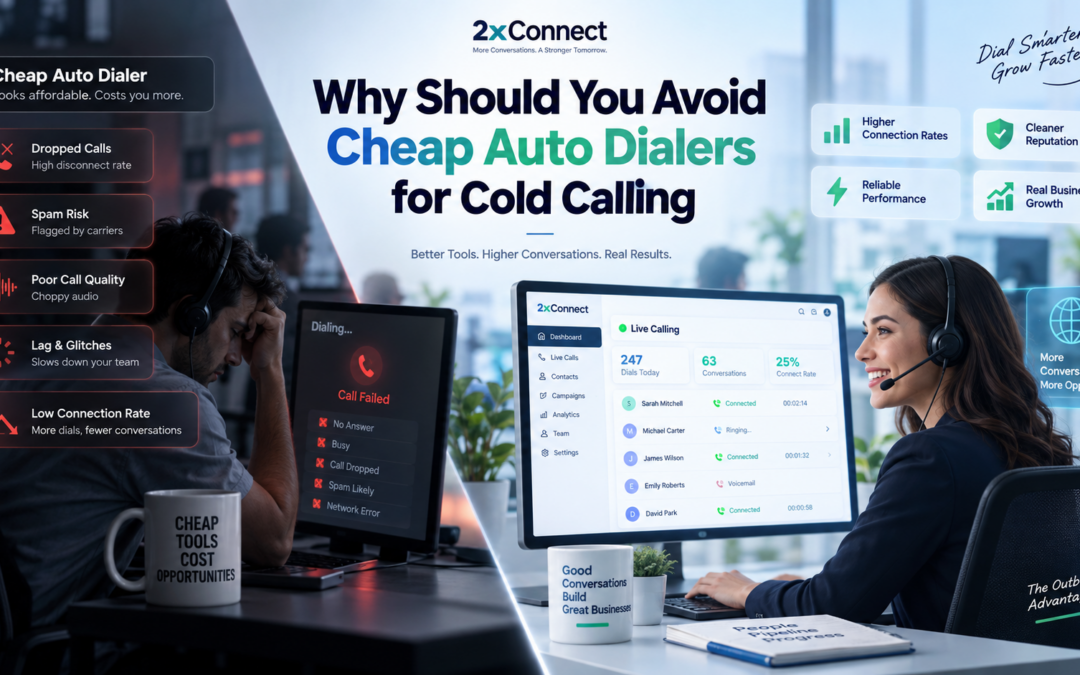
The sales manager stares at the dashboard. Dials up. Conversations flat. Meetings declining. The team is working harder than ever and producing less than they did six months ago.
The culprit is not the list. It is not the reps. It is sitting right there in the tech stack, quietly costing the team more than it saves: the cheap auto dialer that looked like a bargain at $49 a month.
It is one of the most common and most expensive mistakes in B2B outbound sales. A team goes looking for a dialing tool, sees a price point that looks reasonable, signs up, and assumes the technology is doing its job. What they do not see, because cheap dialers are not built to show it, is everything the platform is failing to do while the team keeps dialing.
Cheap often does not mean affordable. It often means the real costs are just harder to see on the invoice.
This guide covers:
- The 7 hidden costs of cheap auto dialers that never appear on the price tag
- A full feature-by-feature comparison: cheap auto dialers versus AI parallel dialing
- The true cost per live conversation, and why the math almost always favors the better tool
- What to look for when evaluating a dialer that actually pays for itself
So, without any further ado, let’s start exploring!!!
What is a Cheap Auto Dialer & Why Do Teams Keep Buying Them?
A cheap auto dialer is a basic sequential dialing tool that automates one thing: clicking the call button. Instead of a rep manually dialing each number, the software dials the next contact on the list as soon as the previous call ends. That is the typical feature set. One number at a time, with limited intelligence, detection, or context.
Teams buy them for an obvious reason: the price point feels safe. $49-$99 per user per month looks reasonable compared to the $400–$500 per user that enterprise platforms charge. For a sales manager under budget pressure, the logic feels sound.
The challenge in outbound sales is not simply initiating more calls. The real bottleneck is the time lost on unanswered calls, voicemails, IVRs, and disconnected numbers. Traditional low-cost dialers increase dialing volume but often fail to optimize the path from a dial attempt to a meaningful customer conversation.
📊 Data point: A 2025 study comparing AI-powered and legacy outbound dialers reported up to a 30% increase in call connection rates with AI-driven systems (Source).
What looks like a dialing solution is actually just a clicking solution. The real cost shows up not in the monthly fee, but in everything the tool does not do.
The 7 Hidden Costs of Cheap Auto Dialers
The price on the invoice is the smallest number in this equation
Every cheap auto dialer comes with a visible cost and an invisible one. The visible cost is the monthly subscription. The invisible costs are what the platform fails to prevent, detect, or automate, and they quietly accumulate until a sales manager stares at a flat pipeline, wondering what went wrong.
Here is the full breakdown:
| The Hidden Cost | What Actually Happens | The Real Impact on Pipeline |
|---|---|---|
| Low answer rates | Single-line dialing, no list intelligence; reps work numbers sequentially through rings/voicemails | 1–2 live conversations/hour; full day needed to match AI parallel dialer output in ~90 minutes |
| Spam flagging with no protection | Limited number pool, no monitoring of caller reputation | “Spam Likely” labels can cut answer rates by 40–60% and severely reduce reach until caller ID reputation is restored |
| Dead air on connection | 2–5s delay before rep connects after answer | Increases early hang-ups → lost conversations |
| Manual CRM logging | Outcomes logged manually after calls | 20–25% of rep time lost; weaker follow-ups and poor coaching data |
| No list intelligence | Numbers dialed in raw order, no prioritization | Wasted dials on low-quality or invalid numbers |
| Little or no compliance automation | DNC/time-zone rules often handled manually | Higher legal risk if TCPA rules are missed (TCPA fines per violation) |
| No scalability | Tools break down as volume/team size increases | Diminishing returns as headcount scales |
📊 Key insight: A 2025 reinforcement learning study on call-center optimization found that optimizing call routing can reduce customer waiting time and agent idle time (Source).
Each of these costs operates independently. A team running a cheap auto dialer is not dealing with one problem. They are dealing with all seven simultaneously, every single dialing session.
The Spam Flagging Problem Nobody Talks About Until It Is Too Late
One flagged number can silently collapse answer rates across an entire region
Of the seven hidden costs above, spam flagging deserves its own section, because it is the most damaging, the least visible, and the hardest to recover from once it happens.
Here is how it works:
- A basic auto dialer dials from a fixed number or a small pool of numbers.
- High-volume outbound from a single number triggers carrier spam detection algorithms.
- The number gets flagged.
- From that point forward, every prospect in the affected region sees ‘Spam Likely‘ on their screen instead of a phone number.
The rep keeps dialing. The platform keeps logging the calls. The numbers keep going up. But the answer rate has quietly collapsed, and nobody notices until a manager pulls the data and realizes the team has been burning through their best contacts on a flagged number for weeks.
A well-built AI parallel dialer significantly reduces this risk through proactive number rotation and real-time spam monitoring. The platform manages number health before a flag happens, not after. Cheap auto dialers typically have no mechanism for this. The team discovers the problem in the data. By then, the damage is already done.
The Compliance Risk That Can End an Outbound Program Overnight
TCPA violations do not come with warnings; they come with invoices
Cheap auto dialers outsource compliance entirely to the rep. DNC list checks, time-zone calling restrictions, connection speed requirements, call logging- all of it lands on a human being who is simultaneously trying to hit dial targets, handle objections, and update the CRM.
The FCC’s 2024 Declaratory Ruling confirmed that AI-generated voices in robocalls are “artificial” under the TCPA and require prior express consent; live-agent dialing remains governed by existing telemarketing compliance rules (Source).
When compliance is automated by the platform, it never gets skipped. When it depends on a rep remembering to check a list manually before every session, it is only a matter of time before it does.
Cheap Auto Dialer vs. 2xConnect: The Full Feature Comparison
Here is the complete side-by-side comparison across every dimension that affects outbound sales performance:
| Feature |
Cheap Auto Dialer |
2xConnect AI Parallel dialer |
|---|---|---|
| Simultaneous dials | 1 (sequential auto-dial) | 2–10 (AI parallel) |
| Live conversations per hour | 1–2 | 8–12 |
| Voicemail / IVR detection | Basic or manual | AI-detected, skipped in milliseconds |
| Connection delay | 2–5 seconds (dead air) | Near-zero perceptible delay |
| Caller ID management | Fixed number or small pool, no monitoring | Auto-rotation + real-time spam monitoring |
| List prioritization | Upload order, no intelligence | AI-ranked by connect likelihood, mobile-first, time-zone filtered |
| CRM integration | None or manual export | Full auto-logging, bidirectional sync |
| DNC compliance | Manual, rep responsibility | Automated before every session |
| Time-zone calling rules | Manual, rep responsibility | Enforced automatically by the platform |
| Pricing model | Low monthly fee + per-dial overages | Flat rate, unlimited dials, no overages |
| Spam protection | None | Proactive number health management |
| Onboarding time | Minimal, because the tool does minimal | Under 30 minutes to first live conversation |
The pattern across every row is the same: a cheap auto dialer automates the click. 2xConnect automates the outcome. One removes a manual step. The other removes the entire manual layer between a rep and a live conversation.
The True Cost Per Live Conversation
The number that actually determines whether a dialing tool pays for itself
The monthly subscription price is the wrong number to compare. It is a fixed cost that says nothing about what the tool actually produces. The number that matters is cost per live conversation: total rep time and tool cost divided by the number of actual human-to-human conversations the platform delivers.
Here is what that calculation looks like in practice:
|
Metric |
Cheap auto-dialer | 2xConnect |
|---|---|---|
|
Monthly dialer cost |
$50–$80/user/month | $150/user/month (flat rate) |
| Live conversations per hour | 1–2 | 8–12 |
| Conversations per 4-hr session | 4–8 | 32–48 |
| Meetings booked per session (illustrative 15% C2M) |
~1 |
~5–7 |
| Manual CRM logging time/week | 8–10 hours | 0 hours (auto-logged) |
| Spam flag risk | High, no number rotation | Near-zero, proactive management |
| TCPA compliance risk | High, manual process | Low, automated by the platform |
| True cost per live conversation | $8–15 (time + tool cost) |
Under $1 |
In outbound sales, live conversations are the primary unit of output that drives meetings and revenue. Everything else dials, hours, emails sent is activity. Conversations are the core asset.
The tool that produces the most conversations at the lowest cost per conversation is the tool that pays for itself, regardless of what it says on the invoice.
Questions to Ask Before Signing Up for Any Dialing Platform
Price is not an evaluation framework; these questions are
Not every expensive dialer is worth the price. The right framework for evaluation is not cost; it is the specific capabilities that determine whether a platform actually improves outbound performance or just replaces one manual step with another.
1. What is the platform’s live conversations per hour benchmark?
Ask for real customer data, not a theoretical maximum. If a vendor cannot provide CPH benchmarks from actual users, that number is not one they are proud of.
2. How does the platform handle voicemail and IVR detection?
Ask for their false-positive rate. A high false-positive rate means reps are being connected to machines. A platform that cannot answer this question does not have the data, which tells you everything about how seriously they take detection accuracy.
3. What is the connection delay between the prospect’s answer and the rep bridge?
Anything over 2 seconds creates dead air. Dead air gets interpreted as a spam call and ends the conversation before the opener lands. Test this during the trial before committing.
4. How does the platform manage caller ID health?
Automatic number rotation and real-time spam monitoring are non-negotiable for high-volume outbound. Ask specifically how many numbers are in the rotation pool and how frequently they are monitored.
5. What CRM integrations exist, and are they native or via Zapier?
Zapier integrations break, lag, and require maintenance. Native bidirectional CRM sync that auto-logs every call outcome without rep action is the standard worth requiring.
Why 2xConnect is Built Differently?
Most dialing platforms are built to a price point. 2xConnect is built to a performance standard, and then priced to make that standard accessible to teams who have been told they need to pay enterprise rates to get it.
The seven hidden costs of cheap auto dialers are not design oversights. They are the direct result of building a tool around a subscription fee instead of an outcome.
2xConnect starts from the other direction: what does an outbound rep actually need to have 8–12 live conversations per hour, compliantly, without friction, and what is the minimum price at which that can be delivered?
The answer is $150 per user per month. Flat rate. No per-dial caps. No hidden number fees. No overages that penalize the team’s best performers at the end of the month.
What that covers:
- Near-zero perceptible delay bridging: The call connects before the prospect has time to reconsider. No dead air. No recovery moment. The opener lands from a position of control.
- AI detection with near-zero false positives: Voicemails, IVRs, busy signals, and bad numbers are skipped in milliseconds. Every connection the rep receives is a live human.
- Proactive caller ID management: Automatic number rotation and real-time spam monitoring mean no single ID is ever overused. Answer rates stay high across every region and every session.
- Full CRM auto-logging: Every call outcome is captured the moment a disposition is clicked. No manual entry. No memory gaps. No end-of-day catch-up.
- Automated compliance: Calling-time restrictions, regulatory safeguards, and outreach rules enforced before every session
A free trial requires no credit card. Setup takes under 30 minutes. 2xConnect provides a 15-minute onboarding call to verify everything works before the team dials a single number.
Try it now and see the difference.
Frequently Asked Questions
Are cheap auto dialers illegal?
Not inherently. Risk comes from how they’re used: without automated DNC scrubbing, time‑zone checks, and proper call logging, high‑volume outbound can increase TCPA exposure. The calling business, not the tool, is typically responsible for compliance.
What is the difference between an auto dialer and an AI parallel dialer?
An auto dialer dials numbers one at a time in sequence, removing the manual click. An AI parallel dialer dials multiple lines simultaneously, skips non‑human answers quickly, and connects reps mainly when a live person answers.
How do I know if my dialer is being flagged as spam?
Watch for unexplained drops in answer rates for specific area codes or regions, especially if list quality and calling hours haven’t changed. Platforms with caller‑ID health monitoring can surface reputation issues before they significantly impact performance.
Is 2xConnect suitable for small teams and solo SDRs?
A solo SDR on 2xConnect gets the same 8–12 conversations per hour as a 50-person sales floor. At $150/month flat with no seat minimums and no per-dial caps, it is one of the only AI parallel dialing platforms built to be accessible to individuals and small teams, not just enterprise organizations with procurement budgets.
How quickly can a team switch from a cheap auto dialer to 2xConnect?
Setup takes under 30 minutes. Export the existing contact list as a CSV, upload it to 2xConnect, connect the CRM via native integration, and start dialing. Most teams have their first live conversation within 2–3 minutes of their first session. There is no complex migration, no IT involvement, and no extended onboarding process.